Manage SharePoint Usage-Based Billing (UBB) with PowerShell
SharePoint Usage-Based Billing (UBB) lets a site use shared Copilot Credits for supported AI features, such as advanced autofill and faster document processing. When credits are unavailable, autofill can fall back to standard processing.
UBB is configured per site. A site owner or administrator can manage the Share Copilot Credits with this site setting in the SharePoint site’s settings experience. The following PowerShell example reports UBB status for SharePoint sites and optionally turns UBB off. It does not enable UBB; use the supported SharePoint settings experience to enable credit sharing.
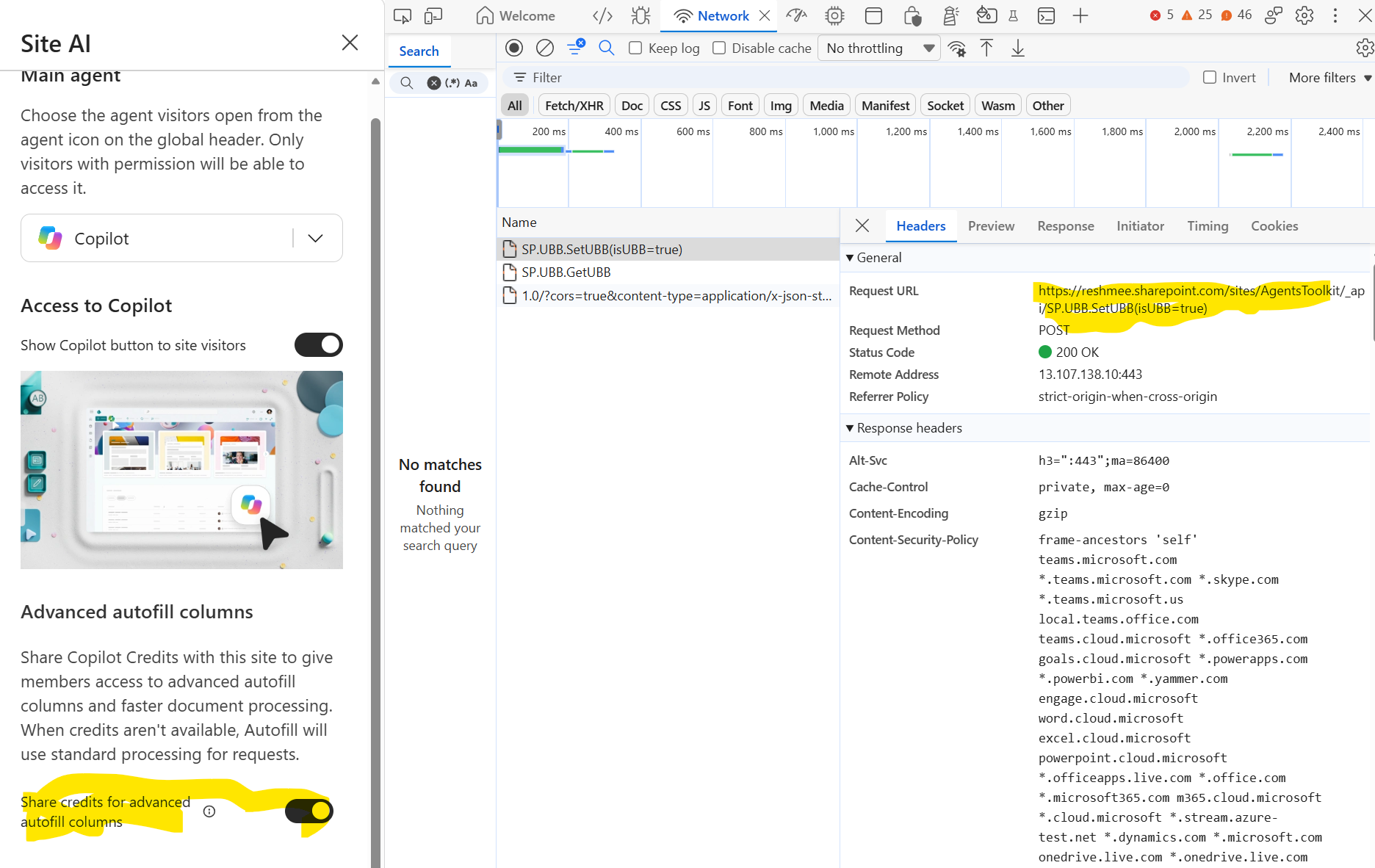
Inspect the UBB request
The SharePoint interface uses these site REST endpoints to read or change the setting:
GET  https://contoso.sharepoint.com/sites/example/_api/SP.UBB.GetUBB
POST https://contoso.sharepoint.com/sites/example/_api/SP.UBB.SetUBB(isUBB=false)
The first request returns the site’s UBB details. The second disables UBB for that site. These are SharePoint service endpoints; confirm their availability and behavior in your tenant before using them in automation.
Prerequisites
- Install the PnP PowerShell module:
Install-Module PnP.PowerShell -Scope CurrentUser. - Use an account with permission to enumerate tenant sites and manage the target sites.
- Set
$tenantAdminUrlto your SharePoint admin center URL, for examplehttps://contoso-admin.sharepoint.com.
Report site UBB status and optionally disable it
The script targets Microsoft 365 group-connected team sites and standard channel sites. It asks whether to disable UBB, collects the status after any requested change, and writes a CSV file to a Logs folder beside the script. Review the site filter and permissions before running it in your tenant.
$tenantAdminUrl = Read-Host -Prompt "Enter the SharePoint admin center URL"
$scriptDirectory = $PSScriptRoot
if (-not $scriptDirectory) {
    $scriptDirectory = (Get-Location).Path
}

$logsFolder = Join-Path -Path $scriptDirectory -ChildPath "Logs"
New-Item -Path $logsFolder -ItemType Directory -Force | Out-Null

$timestamp = Get-Date -Format "yyyyMMdd-HHmmss"
$reportOutput = Join-Path -Path $logsFolder -ChildPath "UBBStatus-$timestamp.csv"

# Connect to the SharePoint admin center to enumerate sites.
Connect-PnPOnline -Url $tenantAdminUrl -Interactive -ErrorAction Stop
$sites = Get-PnPTenantSite | Where-Object {
    $_.Template -in @('GROUP#0', 'TEAMCHANNEL#0')
}

$turnOffUBB = (Read-Host -Prompt "Turn off UBB on all listed sites? (yes/no)") -match '^(?i:y|yes)$'

$results = foreach ($site in $sites) {
    $siteUrl = $site.Url
    Write-Host "Processing $siteUrl"

    try {
        Connect-PnPOnline -Url $siteUrl -Interactive -ErrorAction Stop

        $ubb = Invoke-PnPSPRestMethod -Url '/_api/SP.UBB.GetUBB' -Method Get -ErrorAction Stop
        if ($ubb.d) { $ubb = $ubb.d }
        if ($ubb.GetUBB) { $ubb = $ubb.GetUBB }

        if ($turnOffUBB -and $ubb.IsUBB) {
            Invoke-PnPSPRestMethod `
                -Url '/_api/SP.UBB.SetUBB(isUBB=false)' `
                -Method Post `
                -ErrorAction Stop | Out-Null

            # Read the setting again to report its current value.
            $ubb = Invoke-PnPSPRestMethod -Url '/_api/SP.UBB.GetUBB' -Method Get -ErrorAction Stop
            if ($ubb.d) { $ubb = $ubb.d }
            if ($ubb.GetUBB) { $ubb = $ubb.GetUBB }
        }

        [PSCustomObject]@{
            SiteUrl                 = $siteUrl
            IsUBB                   = $ubb.IsUBB
            EnabledDate             = $ubb.EnabledDate
            CurrentUserCreditStatus = $ubb.CurrentUserCreditStatus
            BillingPointOfContact   = $ubb.BillingPointOfContact
        }
    }
    catch {
        Write-Warning "Failed to get or update UBB details for ${siteUrl}: $_"
    }
}

$results | Export-Csv -Path $reportOutput -NoTypeInformation
Write-Host "UBB report saved to $reportOutput"
If the script prompts for authentication while connecting to individual sites, complete the sign-in for each site. Check the warnings and CSV output after the run; sites that could not be read or updated are not included in the report.