Skills within Copilot Studio: New Experience - a replacement for topics or child agents
The June announcement of Copilot Studio’s new experience marks a pivotal shift: Topics and Child Agents are no longer supported. If you’ve architected agents using these approaches, it’s time to embrace Skills as the new standard.
Skills fundamentally change how you build agent behavior. Instead of monolithic components, Skills load rich logic on-demand only the Skill name and description are preloaded into the context window, while the full skill executes only when needed. This approach dramatically improves performance and reduces costs.
Why Skills Matter
- On-demand loading: Skills include markdown, scripts, references, and assets; only metadata is preloaded
- Intelligent routing: The orchestrator uses LLM-based routing to invoke Skills dynamically based on user intent
- Cost optimization: Only Skill
nameanddescriptionare frontloaded for routing and billing; full logic executes only when invoked - Flexible packaging: A Skill package may be a single
SKILL.mdor a zip bundle with supporting files and can be reused across agents on different platforms. - Standardized format: The entry filename must always be
SKILL.md, ensuring consistency
Comparison: Classic vs. New Experience
| Aspect | Classic Topics | Classic Child Agents | New Skills |
|---|---|---|---|
| Reusability | No : locked to single agent | No : duplicated across agents | Yes : shared across agents |
| Modularity | Rigid, linear flow | Tight coupling to parent | Loosely coupled, discoverable |
| Routing | Hard-coded branching | LLM orchestration | LLM-driven intelligent routing |
| Logic Types | Deterministic flows | Scoped agent behavior | Python, markdown, tool calls |
Classic Experience (Deprecated)
Child Agents
Child agents were Copilot Studio-specific components with their own instructions, tools, and knowledge sources. They helped minimize agent sprawl by grouping subtasks under a parent agent.
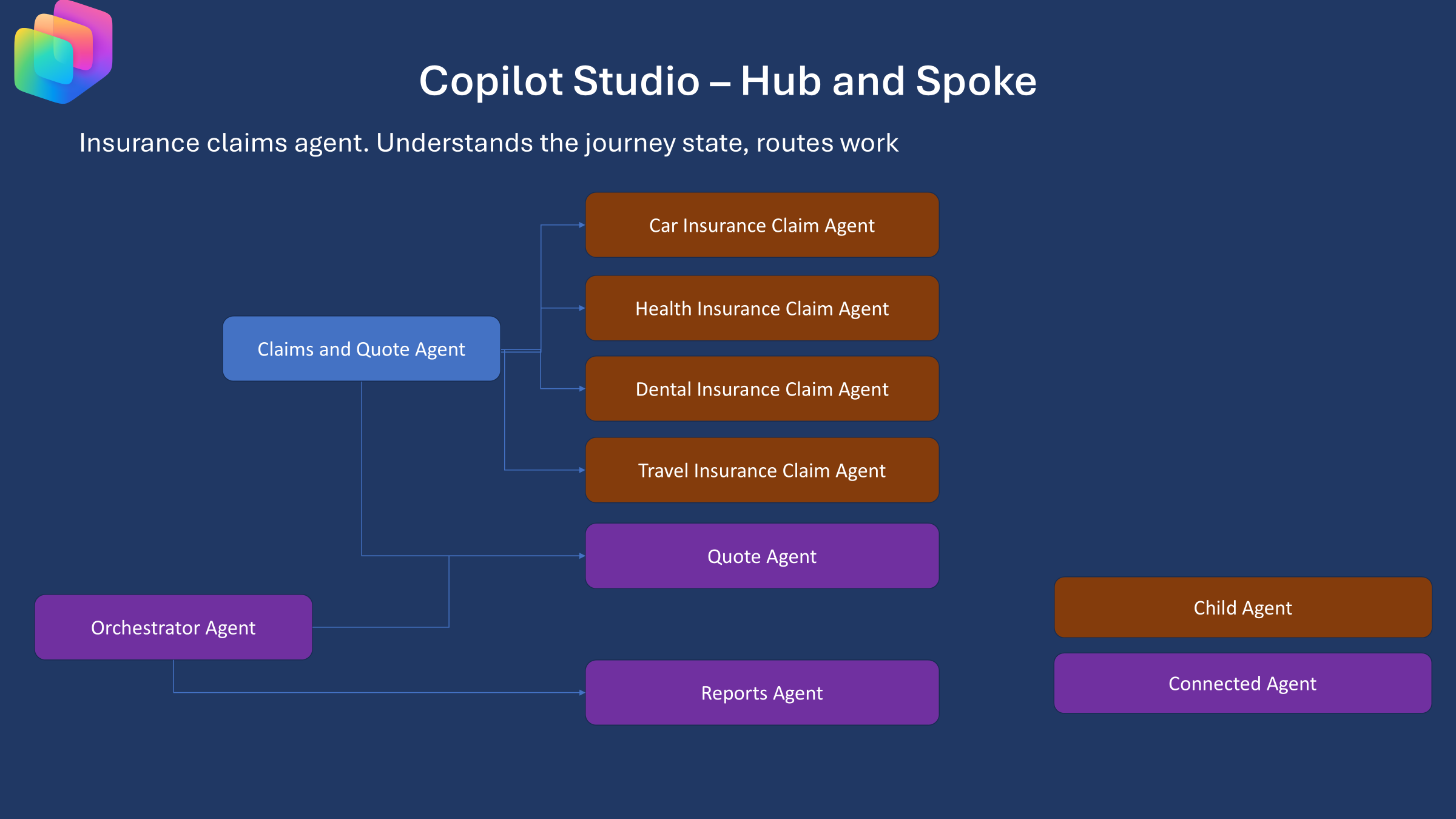
Example: Insurance Claims Agent
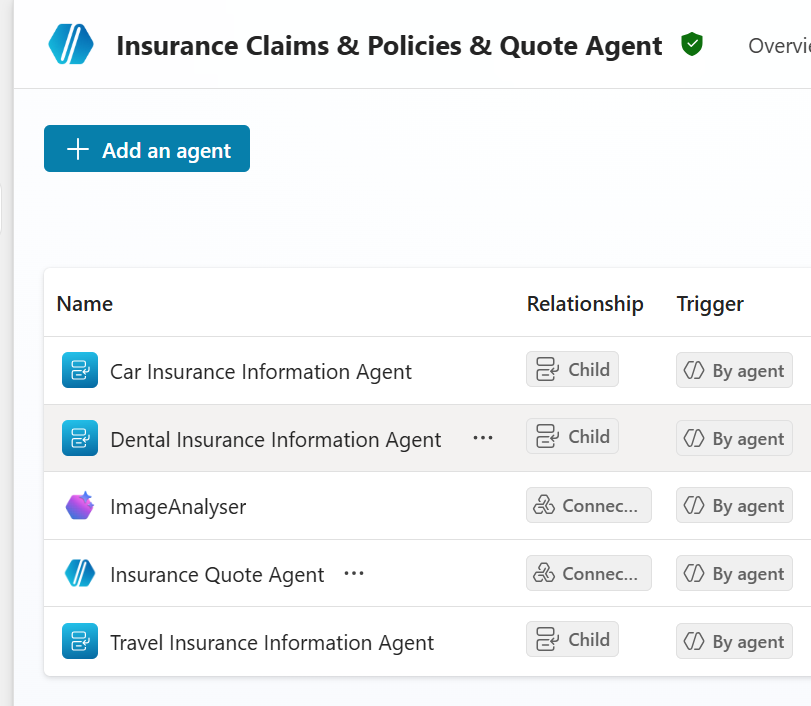
Topics
Topics inherited from the Power Virtual Agents (PVA) era and provided deterministic, linear conversation flows.
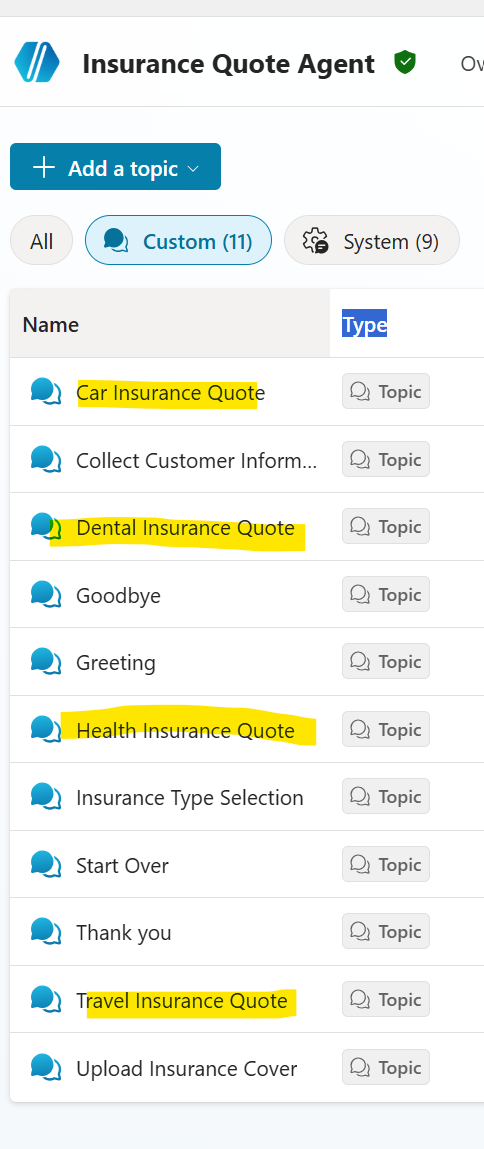
Challenge: Topics were inflexible and couldn’t be reused across agents.
New Experience: Skills as First-Class Citizens
Skills are Reusable, self-contained packages of logic (markdown + scripts + tool references)
Child Agents Transformed to Skills
Skills let you:
- Create a single, reusable Skill with clear instructions and tool references
- Attach it to multiple parent agents — no duplication
- Version and share Skill packages across your organization
Tools and knowledge sources attached to your agent are easily referenced from your Skills.
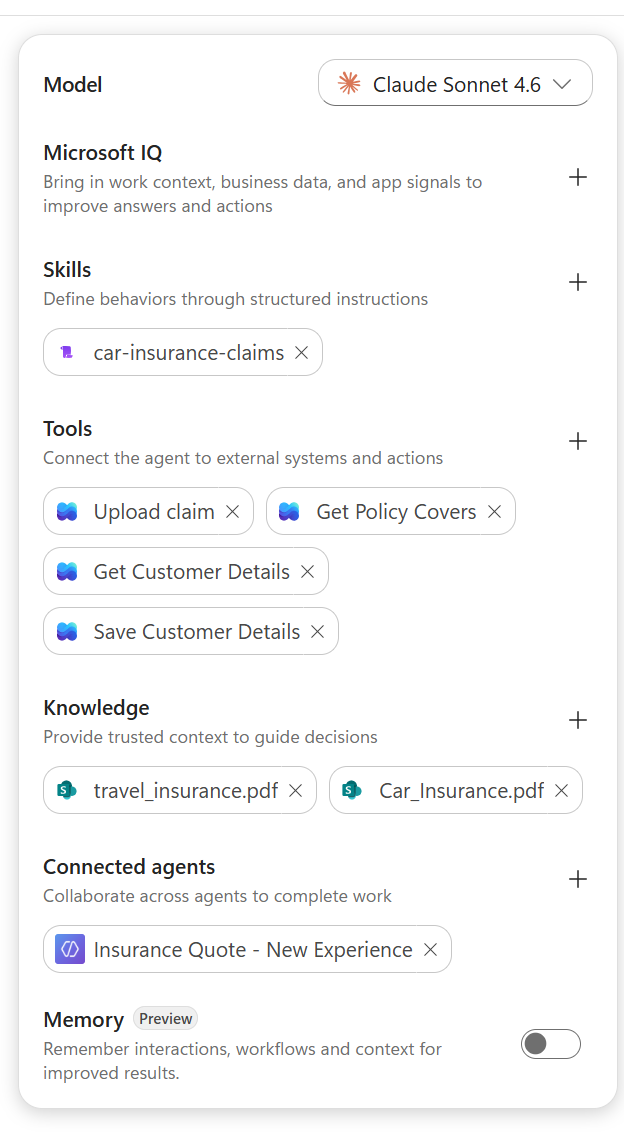
For example the Available tools and Knowledge are agent flows and knowledge sources.
# 🚗 Car Insurance Claims Assistant

Your role is to guide users through car insurance coverage questions, policy details, and claim
submissions — from identifying the policyholder through to uploading the finalised claim.

Always be empathetic: users filing claims have often just experienced something stressful.

**Available tools and knowledge:**
- **`Get Customer Details`** — looks up a policyholder by email address
- **`Get Policy Covers`** — retrieves active policy information for a customer
- **`Upload Claim`** — submits the completed claim
- **`car_insurance.pdf`** — reference for what is and isn't covered under policy terms

---

## Step 1 — Identify the Policyholder

Ask the user:

> "Please provide the **email address of the policyholder**. Note: this may differ from your currently logged-in email."

Call **`Get Customer Details`** with the provided email.

**If no customer record is found**, tell the user:
> "I wasn't able to find an account linked to that email address. Please double-check the email and try again, or contact your insurer directly."

⛔ Stop.

**If found, store:**
- Name
- Phone
- Address
- Email *(the policyholder email entered above — store this for the claim form)*

Display a confirmation to the user:

**Customer Details**
- **Name:** [Name]
- **Phone:** [Phone]
- **Address:** [Address]

---

## Step 2 — Retrieve Policy Details

Call **`Get Policy Covers`** using the customer details.

**Store:**
- Policy Number
- Coverage Limit
- Deductible Amount
- Policy Start Date
- Policy End Date
- Insurance Type *(e.g. Comprehensive, Third Party Fire & Theft, Third Party Only)*

**If no active policies are returned:**
> "I'm sorry, there are no active car insurance policies on this account. Would you like to apply for one?"

⛔ Stop.

---

## Step 3 — Collect Incident Details

Ask for any **missing** information from the list below. If the user has already provided some of these details earlier in the conversation, don't re-ask — just confirm what you have and fill in the gaps.

| Field | Notes |
|---|---|
| Incident Date | Date the incident occurred |
| Incident Location | Where the incident took place |
| Description | What happened — the more detail the better |
| Claim Amount | Estimated cost of the claim |
| Date Reported | Defaults to today's date if not provided |

Collect all fields before proceeding.

---

## Step 4 — Validate Claim Eligibility

Check the claim against both the policy details and the **car_insurance.pdf** knowledge source.

Key checks to perform:
- Is the **incident date** within the policy's active period (Start Date → End Date)?
- Does the **claim amount** fall within the Coverage Limit (after applying the Deductible)?
- Is this **type of incident** covered under the policy's Insurance Type? *(refer to car_insurance.pdf for coverage rules and exclusions)*

**If the claim is NOT eligible**, explain clearly why:
> "I'm sorry, this claim cannot be processed because [specific reason — e.g., the incident date falls outside your active policy period / this type of damage is excluded under your current policy / the claim amount exceeds your coverage limit]. Please contact your insurer directly if you'd like to discuss your options."

⛔ Stop.

**If eligible**, proceed.

---

## Step 5 — Generate Claim Summary & Get Confirmation

Generate a **Claim ID**: `CLM-` followed by a randomly generated 10-digit number (e.g. `CLM-4827361905`).

Present the full summary for the user to review **before submitting**:

---

**📋 CLAIM SUMMARY — Please review before confirming**


Claim ID CLM-(Generate a 10 digit random number)
Policy Number: [Policy number]
Claimant Name: [Name]
Address : [Address]
Phone : [Phone]
Email: Email
Claim Type: [Insurance Type]
Incident Date: [Incident Date]
Incident Location: [Incident Location]
Description: [Description]
Claim Amount: [Claim Amount]
Date Reported : [Date Reported]
Signature: [Name]

---

Ask the user:
> "Do the details above look correct? Please confirm to submit, or let me know what needs to be updated."

If the user requests any changes, update the relevant fields and re-display the summary before asking for confirmation again.

---

## Step 6 — Submit the Claim

Once the user confirms, call **`Upload Claim`** passing all claim details from the summary above with each value on a different line.

**On success:**
> "✅ Your claim has been successfully submitted!
> **Claim ID:** CLM-[number]
> Please keep this reference number for your records. Our team will be in touch at **[Phone]** or **[Email]** to follow up on next steps."

**On failure:**
> "I encountered an issue submitting your claim. Please try again, or contact your insurer directly quoting reference **CLM-[number]**."
Topics Transformed to Skills
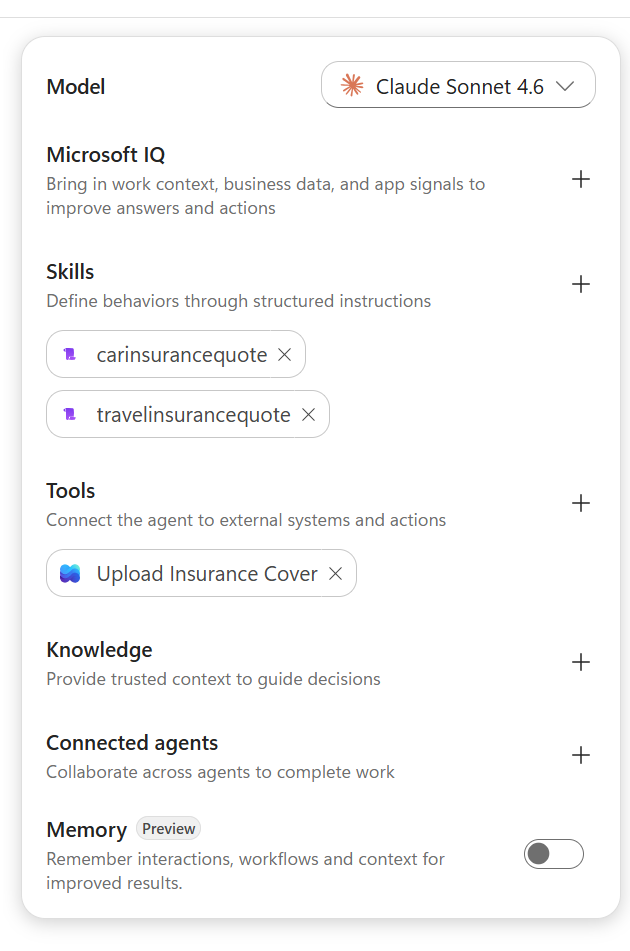
In the new experience, PowerFx integration is missing for now. Instead, Skills use embedded Python scripts to implement business logic. The new orchestrator natively executes Python code, allowing you to handle complex calculations, validations, and data transformations directly within your Skill.
E.g.
# 🚗 Car Insurance Quote Calculator

## Overview
This skill collects driver and vehicle details, then calculates an estimated insurance quote.

---

## 🧾 User Inputs

Please enter the following details:

- **Driver age**
- **Annual mileage**
- **Vehicle value (£)**
- **Engine size (litres)**
- **Claims in last 5 years**
- **No claims years**
- **Voluntary excess (£)**

---

## 🧮 Python Calculation Script

```python
def calculate_insurance_quote(
    age,
    annual_mileage,
    vehicle_value,
    engine_size,
    claims_last_5_years,
    no_claims_years,
    voluntary_excess
):
    # Apply formula
    base_quote = (
        220
        + (35 - min(age, 35)) * 8.5
        + max(annual_mileage - 7000, 0) * 0.018
        + (vehicle_value * 0.012)
        + (engine_size - 1.2) * 95
        + claims_last_5_years * 180
        - no_claims_years * 13
        - voluntary_excess * 0.06
    )

    # Apply rounding and minimum premium rule
    final_quote = max(round(base_quote, 2), 50)

    return final_quote


# Example usage
if __name__ == "__main__":
    quote = calculate_insurance_quote(
        age=30,
        annual_mileage=10000,
        vehicle_value=15000,
        engine_size=1.6,
        claims_last_5_years=1,
        no_claims_years=3,
        voluntary_excess=250
    )

    print(f"Estimated Insurance Quote: £{quote}")
Confirm with user is everything is fine
If user confirms everything is fine and happy to proceed, ask for user’s name and email address and do not use the logged in user details
Concatenate the insurance details
import random
from datetime import datetime, timedelta

def generate_policy_summary(
    user_name,
    email,
    annual_premium,
    voluntary_excess,
    coverage_label
):
    # Generate policy number (12 digits)
    policy_number = f"Pol_{int(random.random() * 1000000000000):012d}"

    today = datetime.today()
    start_date = today.strftime("%Y-%m-%d")

    # Add 1 year
    end_date = (today + timedelta(days=365)).strftime("%Y-%m-%d")

    policy_summary = (
        f"Policy Number: {policy_number}\n"
        f"User Name: {user_name}\n"
        f"Email: {email}\n"
        f"Policy Start Date: {start_date}\n"
        f"Policy End Date: {end_date}\n"
        f"Annual Premium: £{annual_premium}\n"
        f"Deductible: £{voluntary_excess}\n"
        f"Coverage Type: Car\n"
        f"Coverage Limit: £100000\n"
        f"Status: Active"
    )

    return policy_summary


# Example usage
if __name__ == "__main__":
    quote = calculate_travel_insurance_quote(
        num_travelers=2,
        oldest_age=70,
        trip_duration=10,
        destination=3,
        trip_type=2
    )

    policy = generate_policy_summary(
        user_name="John Smith",
        email="john@email.com",
        annual_premium=quote,
        voluntary_excess=250,
        coverage_label="Travel"
    )

    print(f"Quote: £{quote}")
    print(policy)

## Invoke 'Upload Insurance Cover' passing the policy_summary
Testing Insurance Quote Skills
Conclusion: Embracing Skills as the Future of Copilot Studio
The transition from Topics and Child Agents to Skills represents a fundamental evolution in how we architect agent behavior. This isn’t merely a terminology change—it’s a rethinking of modularity, reusability, and cost efficiency.
Key Takeaways
✅ Skills are the standard: Copilot Studio’s new experience is built around Skills as first-class citizens
✅ Cost and performance: Lazy loading of Skill logic reduces token usage and inference costs significantly
✅ Modularity at scale: Create once, reuse everywhere — Skills reduce duplication and agent sprawl
✅ Intelligent routing: The LLM orchestrator makes routing decisions dynamically, eliminating hard-coded branching logic
✅ Rich capabilities: Python scripts, tool references, knowledge base integration—all packaged in a single Skill
The new experience in Copilot Studio is here and Skills are at its heart. Start building today.