Reset SharePoint unique permissions in Power Automate
Reset unique permissions on a SharePoint list item in Power Automate
When a SharePoint item or folder has unique permissions, you can reset it to inherit permissions from its parent using the SharePoint REST API in a Power Automate flow.
Use the HTTP action
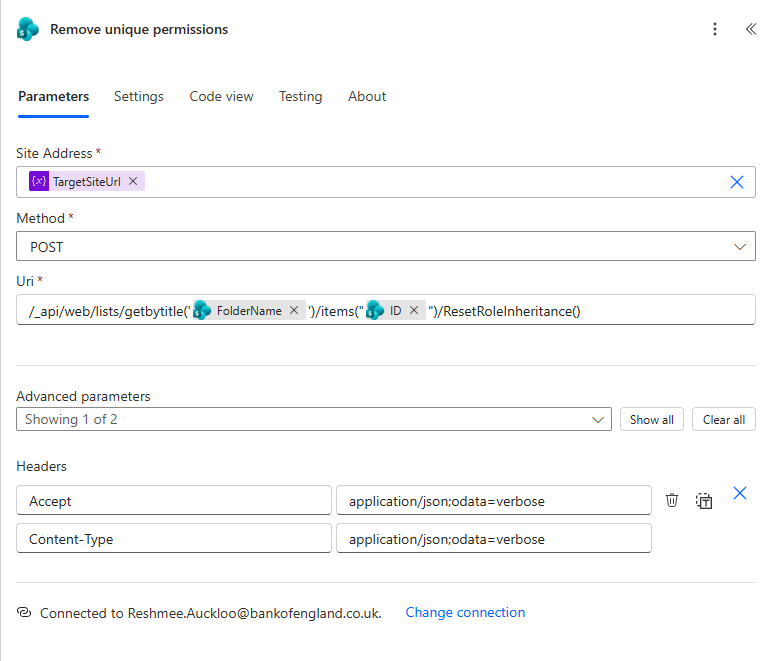
Add a Send an HTTP request to SharePoint action and configure it like this:
- Site Address: Your site URL
- Method: POST
- Uri:
/ _api/web/lists/getbytitle('@{item()?['FolderName']}')/items(@{item()?['ID']})/ResetRoleInheritance()
This call tells SharePoint to remove the item’s unique permissions and revert it back to the parent list or folder permission inheritance.
When to use it
- After breaking inheritance to make an exception for a single item or folder
- When you want to restore standard list permissions
- When you need to automate permission cleanup in a flow
Example flow pattern
- Get the item or folder from the list.
- Use the item metadata to populate
FolderNameandID. - Call the
ResetRoleInheritance()endpoint.
This is a reliable way to automate permission reset without relying on the SharePoint UI.