SharePoint File/Folder hero link sharing settings update
Control who can share an item
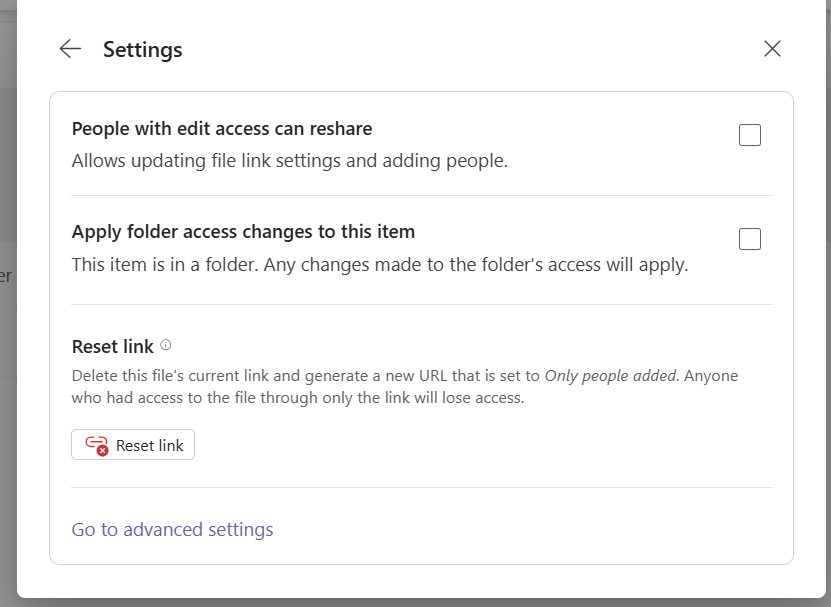
By default, users with edit access can also share a file or folder in the modern sharing experience. The Members can share setting controls this behavior for an individual item.
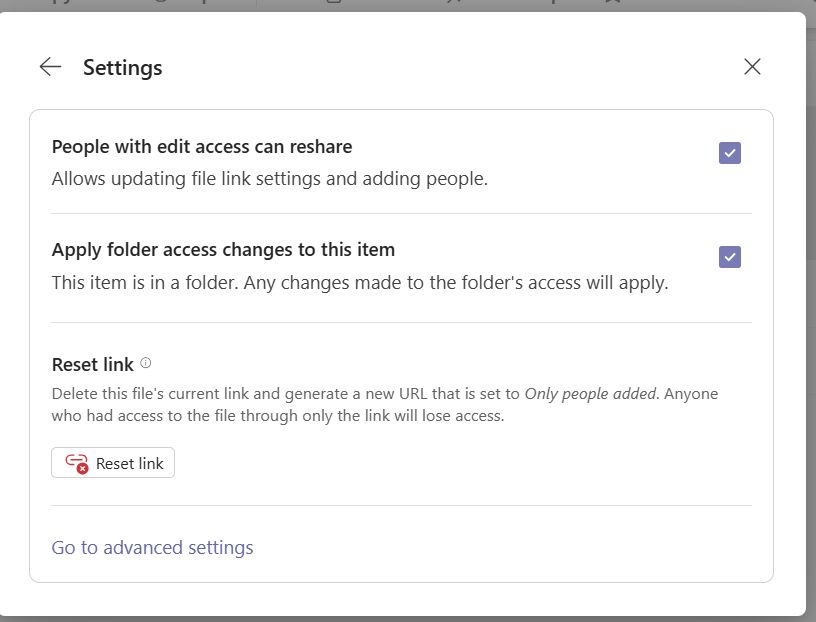
You can change this setting on an individual file or folder, giving you more granular control than the site-level setting used to restrict member sharing in the classic sharing experience.
Set the per-file sharing settings with PnP PowerShell
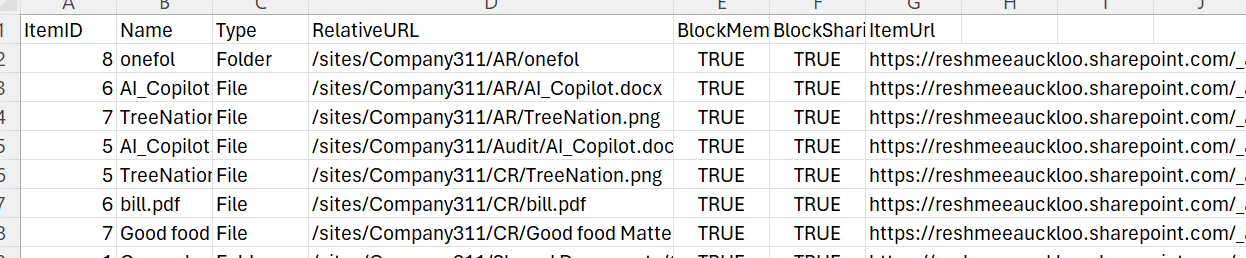
The script below connects to one site and processes every item in its non-hidden document libraries, excluding the system libraries listed in the script. It sets Block members can share (also known as People with edit access can reshare) and Block sharing pushdown (also known as Apply folder access changes to this item) to true, then exports a CSV report to a Logs folder beside the script.
Before running: This script changes sharing settings on every item it processes, including folders. Test it on a non-production site first. Install the PnP PowerShell module and sign in with an account that has permission to update these items.
#Parameters
#$tenantUrl = Read-Host -Prompt "Enter tenant collection URL";
$dateTime = (Get-Date).ToString("yyyyMMdd-HHmmss")
$invocation = (Get-Variable MyInvocation).Value
$directorypath = Split-Path $invocation.MyCommand.Path
$fileName = "SharingSettings_Update-" + $dateTime + ".csv"
$ReportOutput = Join-Path $directorypath (Join-Path "Logs" $fileName)

# Ensure the logs folder exists
$logsFolder = Split-Path -Path $ReportOutput -Parent
if (-not (Test-Path -Path $logsFolder)) {
    New-Item -Path $logsFolder -ItemType Directory
}

# Ensure the file exists
if (-not (Test-Path -Path $ReportOutput)) {
    New-Item -Path $ReportOutput -ItemType File
}

#Connect to PnP Online
#Connect-PnPOnline -Url $tenantUrl -Interactive
#write-host $("Start time " + (Get-Date))
$global:Results = @();

$blockMembersCanShare = "true"
$blockSharingPushDown = "true"
function updateSharingSettings($_object,$_type,$_siteUrl,$_list)
{
    $sharingSettings = Invoke-PnPSPRestMethod -Method Post -Url "$($_siteUrl)/_api/web/Lists(@a1)/GetItemById(@a2)/GetSharingInformation?@a1='{$($_list.Id)}'&@a2='$($_object.Id)'"  -ContentType "application/json;odata=verbose" -Content "{}"
    $ItemUrl = $sharingSettings.ItemUrl

    Invoke-PnPSPRestMethod -Method Patch -Url "$($ItemUrl)?$select=sharingSettings" -Content "{'sharingSettings':{'blockMembersCanShare':$blockMembersCanShare,'blockSharingPushDown':$blockSharingPushDown}}" | Out-Null

    $sharedLinkObject = New-Object PSObject -property $([ordered]@{
            ItemID   = $_object.Id
            Name = $_object.FieldValues.FileLeafRef ?? $_object.FieldValues.Title
            Type = $_type
            RelativeURL = $_object.FieldValues.FileRef ?? ""
            BlockMembersCanShare = $blockMembersCanShare
            BlockSharingPushDown = $blockSharingPushDown
            ItemUrl = $sharingSettings.ItemUrl
        })
        $global:Results +=$sharedLinkObject;
}

    #Exclude system lists
$ExcludedLists = @("Access Requests", "App Packages", "appdata", "appfiles", "Apps in Testing", "Cache Profiles", "Composed Looks", "Content and Structure Reports", "Content type publishing error log", "Converted Forms",
    "Device Channels", "Form Templates", "fpdatasources", "Get started with Apps for Office and SharePoint", "List Template Gallery", "Long Running Operation Status", "Maintenance Log Library", "Images", "site collection images"
    , "Master Docs", "Master Page Gallery", "MicroFeed", "NintexFormXml", "Quick Deploy Items", "Relationships List", "Reusable Content", "Reporting Metadata", "Reporting Templates", "Search Config List", "Site Assets", "Preservation Hold Library",
    "Site Pages", "Solution Gallery", "Style Library", "Suggested Content Browser Locations", "Theme Gallery", "TaxonomyHiddenList", "User Information List", "Web Part Gallery", "wfpub", "wfsvc", "Workflow History", "Workflow Tasks", "Pages")

#$m365Sites = Get-PnPTenantSite| Where-Object { $_.Url -like '*/sites/*' -and $_.Template -ne 'RedirectSite#0' }
#$m365Sites | ForEach-Object {
$siteUrl = Read-Host -Prompt "Enter site URL";
#$siteUrl = $_.Url;
Connect-PnPOnline -Url $siteUrl -Interactive

Write-Host "Processing site $siteUrl"  -Foregroundcolor "Red";

$ll = Get-PnPList -Includes BaseType, Hidden, Title,HasUniqueRoleAssignments,RootFolder | Where-Object {$_.Hidden -eq $False -and $_.Title -notin $ExcludedLists -and $_.BaseType -eq "DocumentLibrary"} #$_.BaseType -eq "DocumentLibrary"
  Write-Host "Number of lists $($ll.Count)";

  foreach($list in $ll)
  {
    #Get all list items in batches
    $ListItems = Get-PnPListItem -List $list -PageSize 1000

    ForEach($item in $ListItems)
    {
            $type= $item.FileSystemObjectType;
            updateSharingSettings $item $type $siteUrl $list;
    }
  }

 $global:Results | Export-CSV $ReportOutput -NoTypeInformation
Write-host -f Green "Sharing Settings Report Generated Successfully!"
write-host $("End time " + (Get-Date))
Outcome
The script updates the selected sharing settings on the files and folders it processes.
The CSV report includes the item ID, name, type, relative URL, applied settings, and item URL.
The setting can’t be controlled at the site or library or tenant level yet. It would be good to have the option at a higher level rather than setting it manually at each file/folder level.