SharePoint Hero Link Update
Hero links are part of the new sharing experience in SharePoint Online. For an overview, see The new sharing experience is coming to SharePoint Online: What admins need to know.
If a hero link is compromised for example, its audience was changed to Anyone and the link is now overshared you may need to change its audience or role. The supported values include:
Audience
- Anyone
- Organization
- OnlyPeopleAdded
Role
view(Can view)restrictedview(Can’t download)review(Can review)edit(Can edit)
Example request bodies to the endpoint:
{"mainLink":{"audience":"Anyone","role":"view"}}{"mainLink":{"audience":"Organization","role":"view"}}{"mainLink":{"audience":"OnlyPeopleAdded","role":"view"}}{"mainLink":{"audience":"Organization","role":"restrictedview"}}{"mainLink":{"audience":"Organization","role":"review"}}{"mainLink":{"audience":"Organization","role":"edit"}}
When possible, updating an existing link can preserve its URL and avoid disrupting people who already use it.
You can update a link for an individual file or folder in the SharePoint UI:
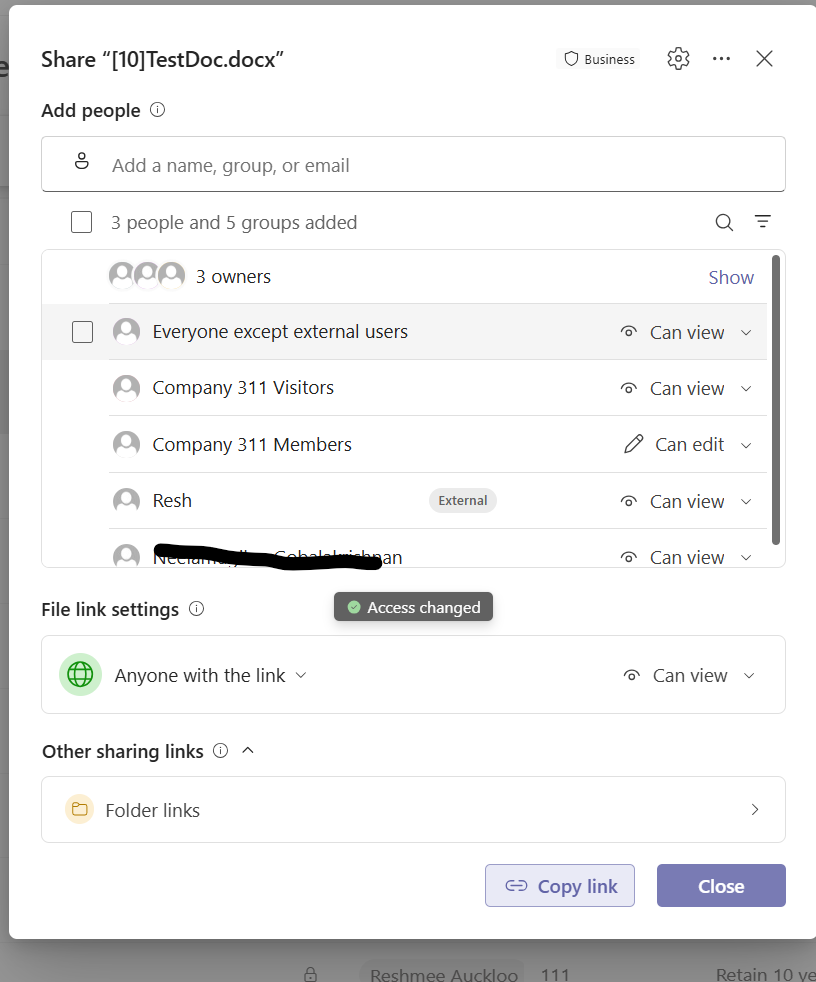
The script below is a site wide remediation example. It checks list items with unique permissions and updates the main sharing link only when its current audience is set to Anyone or Organization back to Only people added to the file have access.
Before running the script: Connect to the site with PnP.PowerShell using an account with sufficient access. Review the target site and expected impact first.
#Parameters
#$tenantUrl = Read-Host -Prompt "Enter tenant collection URL";
$dateTime = (Get-Date).toString("dd-MM-yyyy-hh-ss")
$invocation = (Get-Variable MyInvocation).Value
$directorypath = Split-Path $invocation.MyCommand.Path
$fileName = "HeroLinks_Update-" + $dateTime + ".csv"
$ReportOutput = $directorypath + "\Logs\"+ $fileName

# Ensure the logs folder exists
$logsFolder = Split-Path -Path $ReportOutput -Parent
if (-not (Test-Path -Path $logsFolder)) {
    New-Item -Path $logsFolder -ItemType Directory
}

# Ensure the file exists
if (-not (Test-Path -Path $ReportOutput)) {
    New-Item -Path $ReportOutput -ItemType File
}

#Connect to PnP Online
#Connect-PnPOnline -Url $tenantUrl -Interactive
#write-host $("Start time " + (Get-Date))
$global:Results = @();

function Get-ListItems_WithUniquePermissions{
    param(
        [Parameter(Mandatory)]
        [Microsoft.SharePoint.Client.List]$List
    )
    $selectFields = "ID,HasUniqueRoleAssignments,FileRef,FileLeafRef,FileSystemObjectType"

    $Url = $siteUrl + '/_api/web/lists/getbytitle(''' + $($list.Title) + ''')/items?$select=' + $($selectFields)
    $nextLink = $Url
    $listItems = @()
    $Stoploop =$true
    while($nextLink){
        do{
        try {
            $response = invoke-pnpsprestmethod -Url $nextLink -Method Get
            $Stoploop =$true

        }
        catch {
            write-host "An error occured: $_  : Retrying" -ForegroundColor Red
            $Stoploop =$true
            Start-Sleep -Seconds 30
        }
    }
    While ($Stoploop -eq $false)

        $listItems += $response.value | where-object{$_.HasUniqueRoleAssignments -eq $true}
        if($response.'odata.nextlink'){
            $nextLink = $response.'odata.nextlink'
        }    else{
            $nextLink = $null
        }
    }

    return $listItems
}

function updateHeroSharingLink($_object,$_type,$_siteUrl,$_list)
{
    $relativeUrl = $_object.FileRef
    $sharingSettings = Invoke-PnPSPRestMethod -Method Post -Url "$($_siteUrl)/_api/web/Lists(@a1)/GetItemById(@a2)/GetSharingInformation?@a1='{$($_list.Id)}'&@a2='$($_object.Id)'&`$Expand=permissionsInformation,pickerSettings"  -ContentType "application/json;odata=verbose" -Content "{}"

    ForEach ($shareLink in $sharingSettings.permissionsInformation.mainaccess)
    {
        $linkDetails = $shareLink.mainlink
        if ($linkDetails.Url) {
        $OldaudienceDescription = switch ($linkDetails.audience) {
            1 { "Only people added" }
            8 { "People in your organization" }
            16 { "Anyone with the link" }
            default { "Unknown ($($linkDetails.audience))" }
        }
        $OldroleDescription = switch ($linkDetails.role) {
            1 { "Can View" }
            2 { "Can Edit" }
            7 { "Can't Download" }
            default { "Unknown ($($linkDetails.role))" }
        }

        if($OldaudienceDescription -eq "Anyone with the link" -or $OldaudienceDescription -eq "People in your organization"){
           #reset link
           Invoke-PnPSPRestMethod -Method Patch -Url "$($sharingSettings.ItemUrl)" -Content "{'mainLink':{'audience':'OnlyPeopleAdded','role':'view'}}" | out-null
           $UpdatedSharingSettings = Invoke-PnPSPRestMethod -Method Post -Url "$($_siteUrl)/_api/web/Lists(@a1)/GetItemById(@a2)/GetSharingInformation?@a1='{$($_list.Id)}'&@a2='$($_object.Id)'&`$Expand=permissionsInformation,pickerSettings"  -ContentType "application/json;odata=verbose" -Content "{}"
           $linkDetails = $UpdatedSharingSettings.permissionsInformation.mainaccess[0]?.mainlink

           $audienceDescription = switch ($linkDetails.audience) {
            1 { "Only people added" }
            8 { "People in your organization" }
            16 { "Anyone with the link" }
            default { "Unknown ($($linkDetails.audience))" }
           }
           $roleDescription = switch ($linkDetails.role) {
            1 { "Can View" }
            2 { "Can Edit" }
            7 { "Can't Download" }
            default { "Unknown ($($linkDetails.role))" }
           }


        $sharedLinkObject = New-Object PSObject -property $([ordered]@{
            ItemID   = $_object.Id
            ShareLink = $linkDetails.Url
            Name = $_object.FileLeafRef ?? $_object.Title
            Type = $_type -eq 1 ? "Folder" : "File"
            RelativeURL = $_object.FileRef ?? ""
            audience  = $audienceDescription
            Oldaudience  = $OldaudienceDescription
            role = $roleDescription
            Oldrole = $OldroleDescription
            shareId = $linkDetails.shareId
            ItemUrl = $sharingSettings.ItemUrl
            HasUniqueRoleAssignments = $_object.HasUniqueRoleAssignments
            # Add other properties as needed
        })
        $global:Results +=$sharedLinkObject;
    }
   }
  }
}
    #Exclude system lists
$ExcludedLists = @("Access Requests", "App Packages", "appdata", "appfiles", "Apps in Testing", "Cache Profiles", "Composed Looks", "Content and Structure Reports", "Content type publishing error log", "Converted Forms",
    "Device Channels", "Form Templates", "fpdatasources", "Get started with Apps for Office and SharePoint", "List Template Gallery", "Long Running Operation Status", "Maintenance Log Library", "Images", "site collection images"
    , "Master Docs", "Master Page Gallery", "MicroFeed", "NintexFormXml", "Quick Deploy Items", "Relationships List", "Reusable Content", "Reporting Metadata", "Reporting Templates", "Search Config List", "Site Assets", "Preservation Hold Library",
    "Site Pages", "Solution Gallery", "Style Library", "Suggested Content Browser Locations", "Theme Gallery", "TaxonomyHiddenList", "User Information List", "Web Part Gallery", "wfpub", "wfsvc", "Workflow History", "Workflow Tasks", "Pages")

#$m365Sites = Get-PnPTenantSite| Where-Object { $_.Url -like '*/sites/*' -and $_.Template -ne 'RedirectSite#0' }
#$m365Sites | ForEach-Object {
$siteUrl = Read-Host -Prompt "Enter site URL";
#$siteUrl = $_.Url;
Connect-PnPOnline -Url $siteUrl -Interactive

Write-Host "Processing site $siteUrl"  -Foregroundcolor "Red";

$ll = Get-PnPList -Includes BaseType, Hidden, Title,HasUniqueRoleAssignments,RootFolder | Where-Object {$_.Hidden -eq $False -and $_.Title -notin $ExcludedLists } #$_.BaseType -eq "DocumentLibrary"
  Write-Host "Number of lists $($ll.Count)";

  foreach($list in $ll)
  {
    #Get all list items in batches
    $ListItems = Get-ListItems_WithUniquePermissions -List $list
    ForEach($item in $ListItems)
    {
            $type= $item.FileSystemObjectType;
            updateHeroSharingLink $item $type $siteUrl $list;
    }
  }

 $global:Results | Export-CSV $ReportOutput -NoTypeInformation
Write-host -f Green "Hero Links Report Generated Successfully!"
write-host $("End time " + (Get-Date))
Script Output
